A discount approval rarely stalls because of someone’s “no”. Often, the person who needs to say yes never saw the request – it sat unread under a meeting invite and two newsletters, and by the time they opened it, the customer had already asked for a status update.
That is the gap Summer ’26 closes for approvals. The release brings approval requests into Slack, where reviewers can approve, reject, and comment without opening Salesforce at all.
The Veloce team will explain what changed, how to wire it up on a Flow approval process, and where the practical line sits between Slack and email. Because – spoiler – the answer is not “always Slack.”
Before this release, getting an approval into Slack meant building it yourself – record-triggered flows, custom messages, buttons wired to process URLs. It worked, but every org rebuilt the same plumbing, and most stopped at approve/reject without comments.
Summer ’26 makes the integration native. Both Flow Approval Processes and Advanced Approvals now surface in Slack. An approver receives the request as a Slack notification, reviews the related details inline, and acts on it there. A submitter gets a notification back when the request moves. The decision is recorded against the approval work item in Salesforce, so nothing about your audit trail or downstream automation changes – only where the click happens.
The Advanced Approvals support is the part that matters for Revenue Cloud. Quote approvals, discount thresholds, and deal-desk sign-offs run through Advanced Approvals, and those are exactly the steps that benefit from leaving the inbox.
The use case below is a single-step discount approval: if a quote’s discount is 15% or higher, it needs sign-off; otherwise it auto-approves. It is deliberately small, so the wiring is visible.
Before any of this works, the org has to be connected to your Slack workspace. On top of that connection, two access requirements apply:
From Setup, open Approval Settings. Two toggles control the new behaviour:
Enable both for the full round-trip experience: the approver is pinged when a request lands, the submitter is pinged when it resolves.
.png)
In Setup, open Flows, create a New Flow, and choose Autolaunched Flow – Approval Process (No Trigger).
Inside it, define the stage and step for the discount check: approval required when Quote.Discount >= 15, auto-approval below that threshold, and a status update on the quote when the decision comes back.
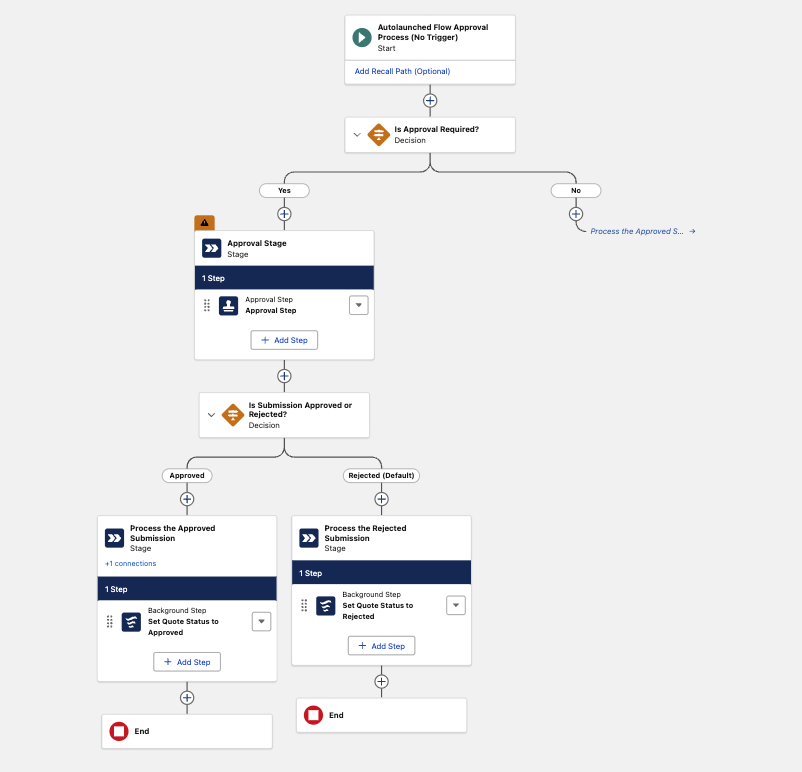
This is standard Flow approval configuration – Slack does not change how the process is modelled, only how the approver is reached.
To trigger the process from the quote, add a quick action backed by a small Apex controller that starts the flow with the record context:
public with sharing class QuoteApprovalController {
    @AuraEnabled
    public static void submitQuoteForApproval(Id quoteId, String submissionComments) {
        Quote quote = [SELECT Discount FROM Quote WHERE Id = :quoteId LIMIT 1];
        Map<String, Object> inputs = new Map<String, Object>{
            'recordId'          => quoteId,
            'submitter'         => UserInfo.getUserId(),
            'submissionComments'=> submissionComments,
            'discount'          => quote.Discount
        };
        Flow.Interview.createInterview('Quote_Approval_Process', inputs).start();
    }
}
Wrap it in a screen quick action (a small LWC modal that collects an optional comment), then add Submit Quote for Approval to the Quote page layout. The component itself is a thin form – a comment field, a submit button, a toast on success. Any standard LWC modal pattern works here.
.png)
Add the Approval Trace component to the quote page so the audit chain is visible while you test. Then:
1. Create a quote, add products, apply a discount above 15%.
2. Click Submit Quote for Approval.
3. In Slack, the approver sees the request with the quote, its key fields, the line items, the submitter, and the condition that triggered it – plus Approve and Reject buttons.
.png)
4. Reject once, resubmit, then approve, and confirm the quote status and Approval Trace update in Salesforce each time.
.png)
.png)
5. Confirm the submitter receives the resolution notification in Slack.
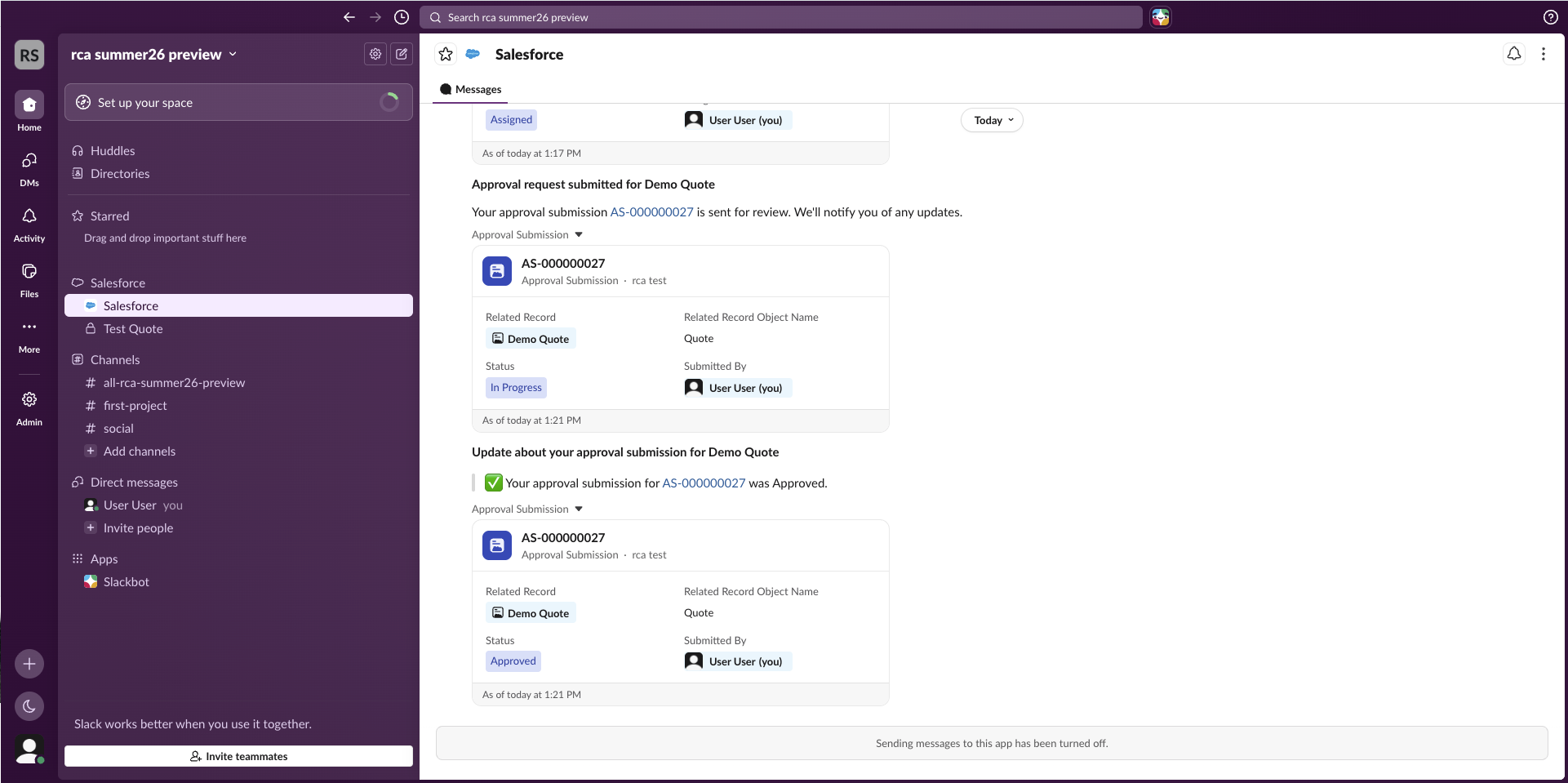
When the quote reflects the Slack decision and the trace shows every action, the loop is closed.
Slack is the better default for some approvals, not all. It wins where requests are frequent and need a fast decision; email holds up for the occasional or external ones. The split comes down to volume and urgency:
Where Slack clearly pulls ahead is the executive who lives in two or three tools and rarely opens Salesforce. An email approval from that person can take a day to surface – a Slack request with the deal context attached can be cleared between meetings. The buttons-and-modal interaction also removes the small friction of formatting an email reply correctly – no one has to remember which keyword the parser accepts.
That mobility is the point: the full cycle – request, decision, comment, notification – runs from a phone, with Salesforce never opened.
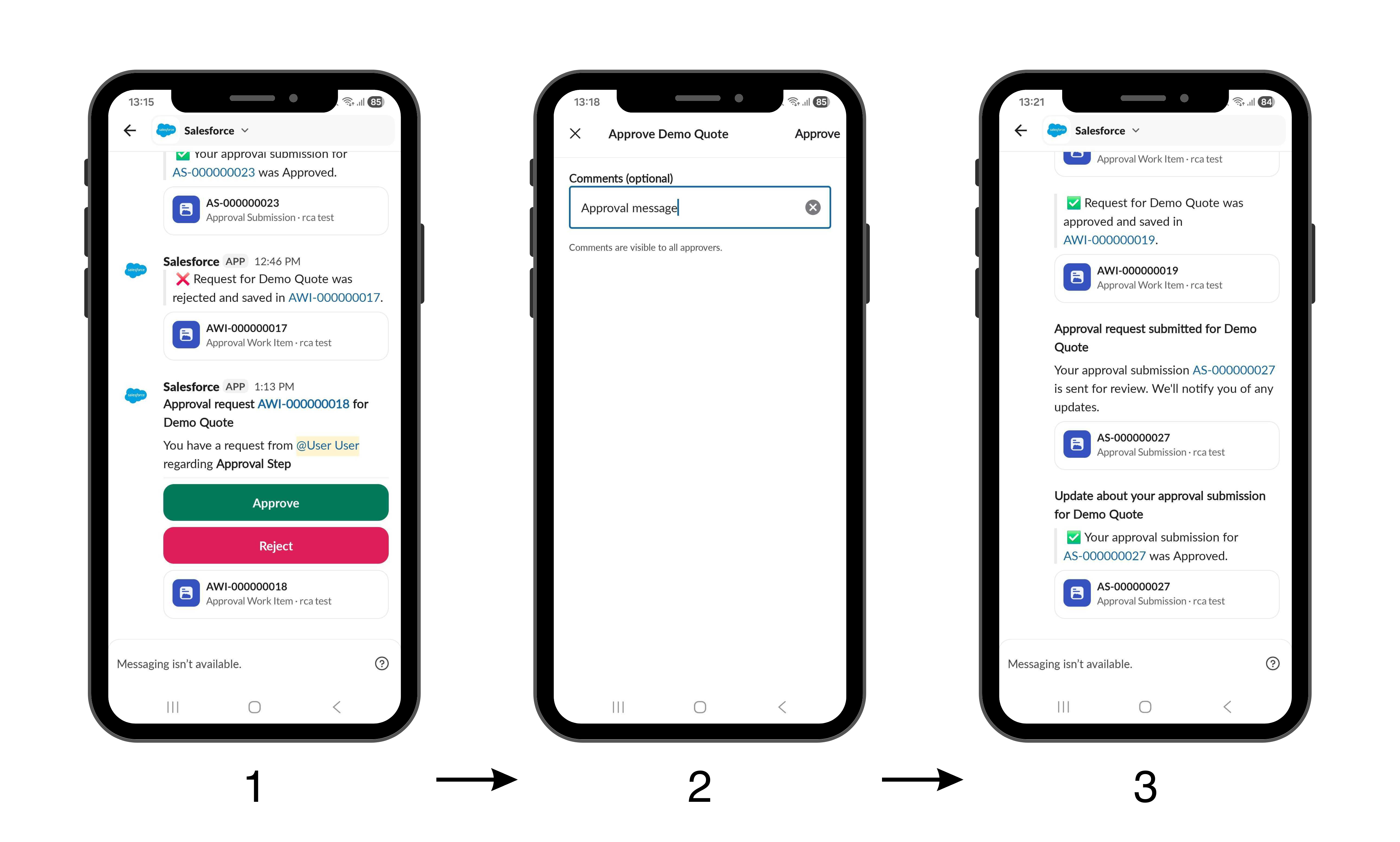
The trade-offs are real, though. The Salesforce-Slack connection has its own setup and permission requirements that sit outside your normal approval config, so it is one more dependency to maintain.
Quote-to-cash has a small number of recurring chokepoints, and approvals sit near the top: discount sign-offs, deal-desk reviews, pricing exceptions. Each one inserts a human decision between a finished quote and a sendable one, and each one is only as fast as the approver’s attention.
Moving those sign-offs into Slack does not redesign the process – the routing logic, the thresholds, the audit trail all stay where they were. It shortens the gap between request and response. For a Salesforce Revenue Cloud (now ARM) team measured on sales velocity, that gap is often the difference between a quote that goes out today and one that goes out tomorrow.
Slack approvals are a workflow change more than a feature change. The approval engine is the same – the inbox is different. For internal, frequent, time-sensitive sign-offs – which is most of what Advanced Approvals handles in a Revenue Cloud org – that difference compounds across every deal.
The right move is not to switch everything over on day one. It is to identify the approval steps where speed is the bottleneck, pilot Slack on those, confirm the trail meets your governance bar, and expand from there.
Do I need Advanced Approvals to use Slack approvals?
No. Both Flow Approval Processes and Advanced Approvals can be acted on in Slack. Advanced Approvals is the relevant engine for Revenue Cloud quote and discount approvals specifically, but the Slack integration is not limited to it.
Where is the approval decision recorded if it happens in Slack?
In Salesforce, against the approval work item. The Slack action syncs back, so your approval history, Approval Trace, and any downstream automation behave exactly as they would if the approver had clicked inside Salesforce.
Can approvers add comments in Slack, or only approve and reject?
In Summer ’26 they can approve, reject, and comment without leaving Slack. This is a step up from earlier Slack approval setups, where comments often required a workaround.
What permissions do approvers and submitters need?
The Connect Salesforce with Slack permission, plus Read access to the Approval Submission object so the request and its context display correctly. The org also has to be connected to your Slack workspace first.
Should we turn off email approvals once Slack is live?
Not automatically. Email still suits occasional approvers, external parties, and teams with strict formal-record requirements. Confirm in a sandbox that the Approval Trace captures everything your governance process needs before removing the email channel.
Do Slack Approvals work on mobile?
Yes. Approvers can review the request, open the related record and line items, and approve or reject from Slack on both desktop and mobile.


.svg)
.png)
.png)
.png)