Salesforce Summer '26: Release Preview for Revenue Cloud teams
What Agentforce Revenue Management teams need to know about Summer '26 – STLE updates, Slack approvals, Product Discovery, and what to verify before GA.
Elena Savenko
Salesforce Developer
8 min read
·
July 20, 2026
Without further ado, our main question is the same as yours: is Summer '26 worth a sandbox cycle?
Short answer: yes – not for one headline feature, but for half a dozen smaller ones that target the friction teams have been working around for releases. Everything is still in preview, so behaviour may shift before general availability.
Below, the Veloce team unpacks what is reasonably known today, what it changes for Revenue Cloud (officially Agentforce Revenue Management) implementation teams, and where we would still wait for confirmation. Let's dive in!
Summary
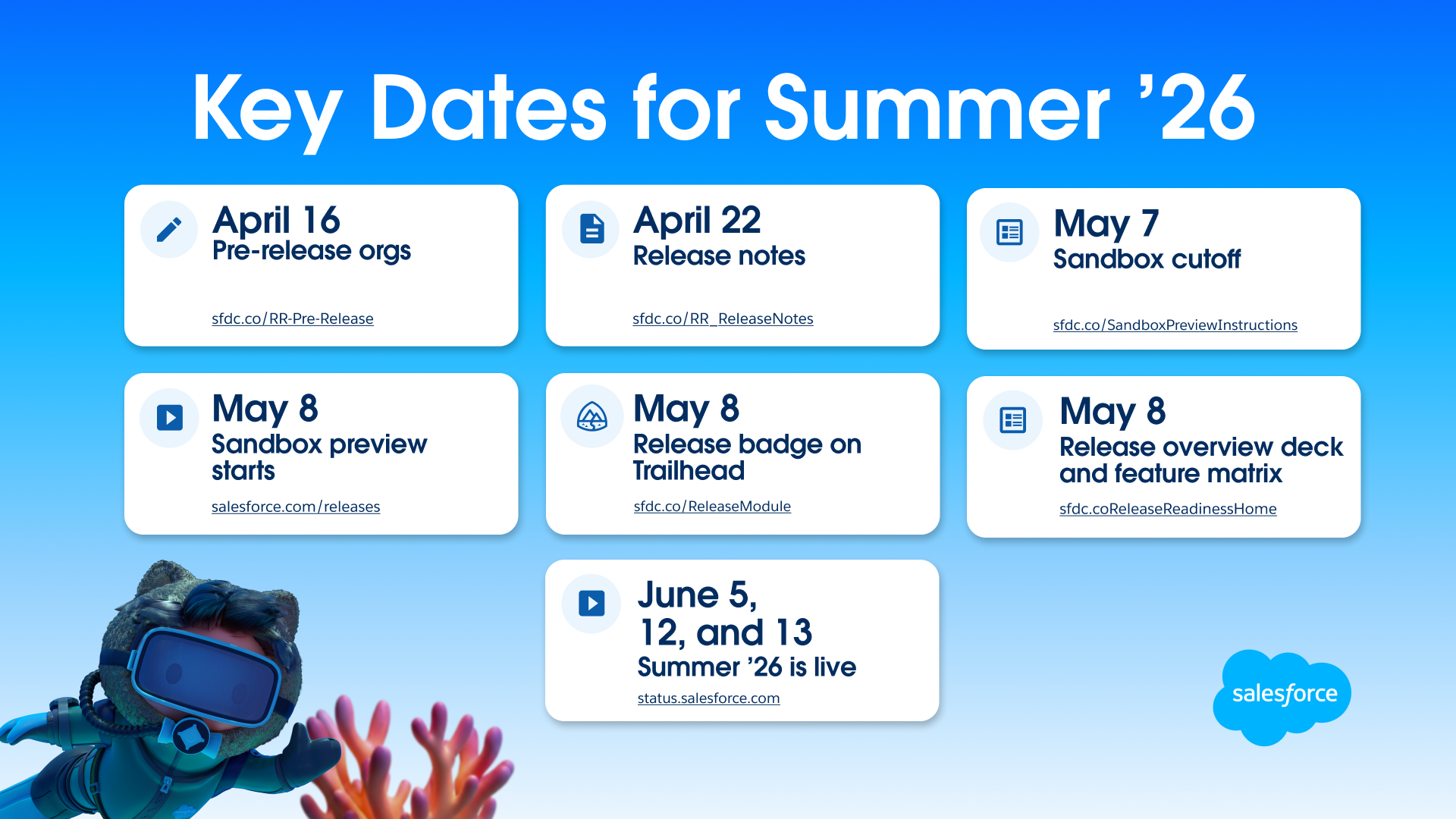
Phased rollout across May 15, June 5, and June 12-13, 2026 – your exact date depends on your instance (check the Maintenance Calendar).
One consistent direction across the release: fewer manual steps and a quieter UI on large transactions.
Biggest practical wins are flexible STLE, Product Discovery as a working surface, Slack-native approvals, and broader Constraint Rules Engine scope.
Everything is still in preview and can shift before GA – test in a sandbox before committing.
Sales Transaction Line Editor: more context, less scrolling
The STLE in Summer’26 is aimed at large quotes and orders: more context on each line, less scrolling, and cloning that preserves structure.
This is a really great addition – long overdue. The extra context and reduced scrolling will make handling large quotes much smoother. Thoughtful design like this actually has a big impact on everyday work.
– Elena Savenko, Salesforce Developer at Veloce
Flexible-height layout and richer side panel
The editor is no longer locked to a fixed height – it expands with the browser window. The side panel shows up to 200 product attributes per quote line using configured display names, with non-visible attributes filtered out. For technical products with dozens of configurable attributes, the side panel becomes a primary working surface rather than an overview.
What to verify: how the side panel performs at the upper end of the 200-attribute range. Test with realistic line counts in sandbox – see the Sales Transaction Line Editor documentation for current setup steps.
Product variations on the quote line
Reps can sell different versions of a single base product – size, colour, configuration – once variations are set up in the catalog. They are added through Browse Catalog or Quick Add, and validated in the side panel before save.
This replaces the workaround of modelling each variant as a separate product, which inflates catalog size and complicates reporting.
Deep Clone for quotes and orders
Deep Clone preserves the full transaction shape: related records (including custom objects), bundled and standalone lines, ramp schedules, and lifecycle artefacts such as amendments, renewals, and cancellations. This is a meaningful upgrade over line-level cloning.
How to enable: Setup → Revenue Settings → turn on Clone Quotes and Orders, then add the Deep Clone action to quote and order page layouts.
What to verify: how Deep Clone interacts with custom validation rules and Apex triggers on related objects. Complex orgs typically discover edge cases in lifecycle records during testing.
Product Catalog Management: Product Discovery as a workspace
End-to-end discovery from catalog to transaction
Excited to test this when the preview becomes available — it looks like it could not only improve the flow but also reduce some of the delays reps face during quote configuration.
This is one of the more substantive UX changes in the release – the shift from "open catalog → pick → return → repeat" to a single working surface noticeably reduces clicks on complex deals.
Excited to test this when the preview becomes available – it looks like it could not only improve the flow but also reduce some of the delays reps face during quote configuration.
– Elena Savenko, Salesforce Developer at Veloce
Variations and ramp selection in Product Discovery
Variations now roll up under a single parent product in discovery – reps adjust attributes and the correct variant lands on the quote. Previously each variation surfaced as an individual product, which made search noisy.
Ramp selection is also exposed earlier: reps choose whether to add products to current or subsequent groups before viewing the product list, and the Configurator honours the selection on save. Before Summer '26, products went into the current group regardless – rework on multi-segment ramp deals was routine.
The Constraint Rules Engine gains scope. Rules can apply not only at product level, but also across quote groups and specific ramp segments – useful for validation, pricing alignment, and consistency on large deals.
The new SalesTransactionGroup definition lets teams group lines logically so dependencies remain manageable inside a quote or ramp segment.
PCM defaults inside constraints
Product defaults from PCM – attributes, attribute values, standard and custom fields – can feed constraint definitions. Configurations stay consistent and there is less duplicated setup between catalog and rules engine.
How: when importing through the CML Editor, include the productField annotation in the constraint to specify which field values to import. Visual Builder imports include PCM defaults automatically.
For background on how CML constraints behave with PCM data, our previous deep dive on Table Constraints in CML still applies – those patterns now extend across more contexts.
What to verify: how group- and ramp-level constraints interact with existing product-level rules in migrated models. Audit named constraints before enabling new scopes in production.
Need help mapping Summer '26 features to your Agentforce Revenue Management roadmap?
Reviewers can approve or reject requests and leave comments without leaving Slack. Finally!
Submitters get real-time notifications when requests are submitted and reviewed. The Approval Trace component on the related record captures all Slack-based actions, so the audit trail stays in Salesforce even though the decision happens elsewhere.
This sounds incremental and behaves like a workflow shift. Email-based approvals consistently lose context in busy inboxes – Slack threads are easier to track. For executives who rarely open Salesforce, the cycle-time difference can be measurable.
What to verify: permission requirements for the Salesforce-Slack connection, and whether the Approval Trace captures every Slack action category your governance team needs.
Invocable actions in approval processes
You can now use invocable actions from autolaunched flows and Apex within approval processes. For example, you can build a flow to review approval work items automatically, or use Apex triggers to cancel pending approvals when related records change.
Billing and Invoice Processing: smarter defaults
Billing changes in Summer '26 are not architectural – they are the kind of defaults that quietly remove manual reconciliation and waiting time from the monthly close. Here are some of the updates:
Future-dated cancellations: billing schedules stay accurate when a quote or order is cancelled before a scheduled future-dated start. Supported for termed and one-time products; reduces manual reconciliation.
Streaming invoices on batch start: invoices appear as the batch run starts, so billing teams can review and send without waiting for the full job to finish.
Simpler monitoring: one batch management job replaces three separate processing steps.
Working-day scheduling: daily and weekly invoice runs can move to the next working day when the planned date falls on a weekend or holiday – aligning with monthly behaviour.
What to verify: how working-day scheduling resolves regional holiday calendars in multi-country orgs. The release notes describe the behaviour at a generic level; multi-region teams should test with their own calendar configuration.
Salesforce Pricing: CSV-backed decision tables
Pricing procedures can use advanced decision tables with CSV as the source, supported under pricing usage types. Imports support up to 100,000 rows for non-versioned and single-versioned tables – meaningful when pricing logic is driven by externally maintained data (regional adjustments, partner discount matrices, channel rates).
Two related improvements: decision tables can sync per pricing recipe – not only the default; and the Map Line Item element supports up to 100 variables, doubled from 50.
How: Setup → Quick Find → Decision Tables → create an advanced table with CSV source → associate with a pricing recipe.
Document Generation: watermarks and an LWC for record pages
Two additions worth noting.
Dynamic text watermarks can be applied at generation time – static labels like Draft or Internal Only, or values pulled from the record. A small change with outsized practical value: the most common doc-gen incident in our experience is sharing the wrong version, not generating the wrong content.
The Generate Document LWC lets users generate and preview from a record page or Flow, with attachment to Word, PowerPoint, and PDF outputs after placing the component on a Lightning record page.
What to prepare now: Veloce’s advice
Concrete steps that pay back regardless of which Summer '26 features your team eventually adopts:
Review licensing and entitlements for features your roadmap depends on – several Revenue Cloud capabilities require specific permission sets or add-ons.
Prepare a scratch sandbox on the preview instance and run a representative end-to-end scenario – quote, approval, billing, document generation – on real data, not sample records.
Get familiar with the updates, analyse them, and test in a sandbox – some new features may replace existing custom solutions in your org (Deep Clone, ramp group selection, PCM defaults inside constraints are common candidates).
Salesforce regularly adjusts release updates between preview and general availability – defer firm rollout commitments until the release notes are finalised for your release window.
Final thoughts
Summer '26 reads as a quality-of-life release for Revenue Cloud. There is no single architectural shift, but described features add up to noticeably less friction on the day-to-day work of quoting, approving, and billing.
And of course, the Spring updates are worth calling out. Promotions, which launched as a beta, looks like it’s just the beginning and will likely keep evolving. The Enhanced Pricing Log is another great addition. More details are available in our previous blog post.
Until GA, treat any specific behaviour as preliminary. The exact UI, configuration surfaces, and limits may shift. Test in sandbox, watch Release Updates in Setup, and prioritise features that close the longest-standing workarounds in your implementation – that is consistently where the highest return sits.
FAQ: Salesforce Summer '26 Release for Revenue Cloud
When does Summer '26 go GA?
Summer '26 rolls out across four release weekends: May 15, June 5, June 12, and June 13, 2026. Your exact date depends on your Salesforce instance.
Can I rely on the features described in preview release notes?
Directionally yes, in detail no. Salesforce regularly adjusts features between preview and GA – behaviour can change, features can be deferred, new ones can be added.
Is Deep Clone a replacement for line-level cloning?
Deep Clone is a separate action that preserves the full transaction structure – related records, ramp schedules, and lifecycle artefacts. Line-level cloning still works; teams choose which fits each scenario.
Do I need a separate license for Slack-based approvals?
The Salesforce-Slack connection has its own permission and configuration requirements outside standard Revenue Cloud entitlements. Confirm with your AE and security team before rolling out.
Are these features available in all Revenue Cloud editions?
Feature availability varies by edition, license, and entitlements. Verify the specific permission sets required for each capability you plan to use – this is the most common cause of post-upgrade surprises.

%20(3)%20(1).png)

.png)
.png)
.png)