Salesforce Document Generation is a core part of Revenue Cloud, now known as Agentforce Revenue Management. It takes a template, fills it with data from Quotes and related objects, and produces a finished document – a proposal, a contract, a pricing sheet.
For most teams, the end-user experience is invisible: click a button, get a document.
That changes when quotes grow into thousands of line items. The process still works – but it needs a different architecture to stay reliable. This article walks through server-side generation and the lessons from Veloce’s project cases with 10,000+ lines.
In a standard Revenue Cloud setup, document generation is triggered directly from the UI. The user clicks a button, the system collects data, merges it with a template, and returns the finished document – all within the same browser session. This is client-side generation, and it works well for small to medium quotes with relatively simple templates.
The architecture assumes a short processing cycle: data travels to the document engine and back while the user waits. When the dataset is small, this round trip feels instant.
As the number of line items grows, the data payload becomes larger and template processing takes longer – while the browser session remains open, waiting. And at some point – the exact threshold depends on the implementation – one of these factors hits a platform limit. The request times out, the payload exceeds the allowed size, or the rendering engine produces an incomplete or corrupted document.
This is not a bug. Client-side generation works within the limits of a browser session, and those limits are real – thousands of line items, complex object relationships, and dynamic content that needs significant data transformation are outside of what it was designed for.
In server-side generation, the document is not produced in the browser. The system runs the process on the backend, so the user is not waiting for it to finish – they trigger generation, optionally set a few parameters, and move on.
The document gets attached to the Quote once it is ready. So, a typical server-side flow goes through these steps:
DocumentGenerationProcess record, which triggers the generation.This diagram shows one of the ways to implement DocGen execution. It doesn't cover the whole end-to-end flow as it is labeled below.
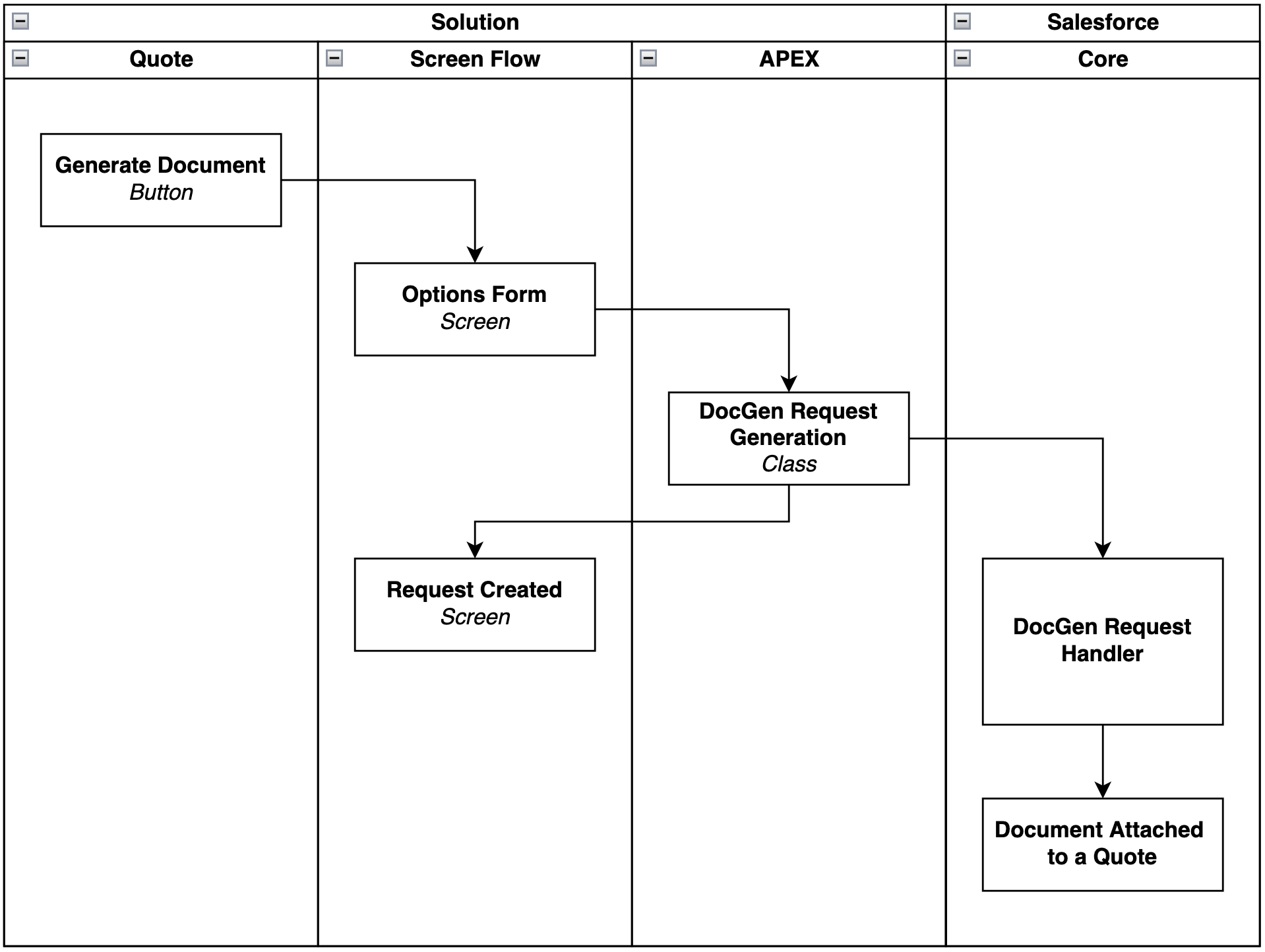
This architecture introduces a processing delay – the user does not receive the document immediately. But it eliminates the constraints that make client-side generation unreliable for large datasets: the browser session is freed, the payload is processed on the server, and the generation engine can take the time it needs without risking a timeout.
One of the most common misconceptions about document generation is treating it as a purely template-driven feature. In standard scenarios with a few dozen line items, this mental model holds: you create a template with placeholders, the system fills them in, and you get a document.
At scale, the picture changes. When a quote has thousands of line items – each potentially linked to additional records, attributes, or conditional fields – the template is the easy part. The hard part is collecting, transforming, and structuring the data before it reaches the template.
This is where Apex becomes essential. Server-side document generation relies on a dedicated Apex class that serves as the data assembly layer. Its responsibilities include:
The quality and efficiency of this data assembly step directly determines whether the generation process succeeds or fails. A poorly structured payload – one that pulls unnecessary fields, creates redundant nesting, or does not align with the template structure – will cause issues regardless of whether the generation itself is server-side or client-side.
.png)
Here is a simplified Apex class for server-side document generation. It covers the core pattern: data assembly, payload construction, and creating the DocumentGenerationProcess record.
public with sharing class VlGenerateDocument {
private static String DEFAULT_DOCUMENT_TEMPLATE_NAME = 'DocGen Template';
@InvocableMethod()
public static void process(List<Id> quoteIds) {
for (Id qId : quoteIds) {
generateDocument(qId);
}
}
private static void generateDocument(Id quoteId) {
Id documentTemplateId = getDocumentTemplateId();
Id templateContentVersionId =
getTemplateContentVersionId(documentTemplateId);
String documentName = generateDocumentName();
Map<String, Object> dataMap = generateDataMap(quoteId);
DocumentGenerationProcess p = new DocumentGenerationProcess(
Type = 'GenerateAndConvert',
DocumentTemplateId = documentTemplateId,
DataRaptorInput = '{"Id":"' + quoteId + '"}',
ReferenceObject = quoteId,
TokenData = JSON.serialize(dataMap),
RequestText = '{"title":"' + documentName
+ '","templateContentVersionId":"'
+ templateContentVersionId + '"}',
HasDocGenFontSource = true,
DocGenApiVersionType = 'Advanced'
);
insert p;
}
}
Several elements in this code deserve attention:
@InvocableMethod makes the class callable from Flows, which allows you to connect a Screen Flow (where the user selects parameters) directly to the Apex logic.
generateDataMap is where the actual data assembly happens. These methods query related objects, structure the results, and add them to the dataMap. In a large-scale implementation, this is where most of the development effort goes.
TokenData is the serialized payload that carries all the assembled data into the document generation engine. The structure of this payload must match the token placeholders in the DOCX template exactly.
DocGenApiVersionType = 'Advanced' turns on the advanced document generation API – needed for complex templates and large datasets.
.png)
This covers the Apex class itself. But the generated output is rarely the same from quote to quote – and maintaining a separate template for every variation is not practical. The next section explains how to avoid that.
Server-side generation allows the document structure to change based on input parameters and conditional logic. This makes it possible to use one template for multiple scenarios – instead of keeping separate, nearly identical templates for each one.
Before generation starts, the user selects options in a modal or Screen Flow – brand, language, document type, whether to include certain sections. The Apex class picks up these selections and uses them to decide:
.png)
This eliminates the need for duplicate templates. One template, multiple outputs – the Apex class determines what goes into each one.
In one of our projects, we had to generate a large, dynamic document from a Quote that contained several thousand to over ten thousand line items, multiple related objects, and – in some cases – images tied to specific line items.
Client-side generation was not an option here. The data volume alone would have led to timeouts. On top of that, we needed to map images dynamically to individual line items, include or exclude sections based on user input, and produce different document types from a single template.
We went with server-side generation, with Apex doing all the data preparation. The implementation:
1. Collected data from Quote Line Items and multiple related objects in structured SOQL queries ↩
2. Mapped product images dynamically to corresponding line items based on file metadata ↩
3. Structured the entire payload to match the template token hierarchy before triggering generation ↩
4. Supported multiple document types (proposals, contracts, pricing sheets) from a shared template structure controlled by input parameters.
As a result, the team could generate complex documents at this volume consistently, maintain a single template, and handle datasets that client-side generation would not have handled.
Server-side document generation solves the scalability problem, but it introduces its own set of considerations. Knowing them upfront saves debugging time and prevents architectural mistakes.
As we mentioned, the most common mistake is underestimating how much effort goes into the data assembly layer. Teams that expect the work to be "mostly template design" find out that 70–80% of the effort is in the Apex logic – querying related objects, handling edge cases, building nested structures, making sure the serialized payload matches the template tokens exactly.
Plan for this from the start. Treat data preparation as a separate workstream with its own testing cycle.
The TokenData field carries the full assembled dataset as a serialized JSON string. For large quotes, this payload grows fast. Server-side processing removes the browser-side constraints, but platform limits on field sizes and Apex heap memory are still there.
Keep an eye on payload size during development. If it gets close to platform limits, look at removing unnecessary fields from the data map, flattening deeply nested structures, or splitting generation into multiple documents.
With server-side generation, there is a delay between the user clicking the button and the document being available. The system needs a way to tell the user when the document is ready.
A platform event, a toast message on record refresh, or an email notification all work – pick what fits your user experience.
Document templates need to follow specific formatting requirements to render correctly. Issues can come up depending on how the DOCX file was created – templates from certain word processors or generated programmatically may not conform to the expected DOCX XML structure.
These problems are not always visible during development. They tend to show up when you test with larger datasets or more complex content. Validate templates early, and test rendering with realistic data volumes (not just a few sample records!).
For small documents – a standard quote with 20 line items, a simple contract – client-side generation is faster, simpler, and gives the user immediate feedback.
Server-side generation is a good fit when documents are rendering-heavy (many tokens, large line counts), when multiple documents need to be generated in a batch, or when generation should be triggered automatically – for example, on a record status change.
Let’s take a closer look:
For a detailed comparison, see Client-Side and Server-Side OmniStudio Document Generation Compared.
Document generation in Revenue Cloud works until your quotes outgrow what a browser session can handle. The gap between a 50-line quote and a 70,000+ line quote is not just about volume – it requires a different architecture and a dedicated data preparation layer.
We recommend to treat data assembly as the primary design challenge, not template design. It only defines the output format, but the Apex layer is where the solution scales or breaks.
For teams already hitting client-side limits, server-side processing is the logical next step. For those planning a new implementation with large datasets, designing for it from the start saves the rework of discovering those limits in production.
What is client-side vs. server-side document generation?
Client-side runs in the browser – the user clicks a button and waits for the document. Server-side runs on the backend asynchronously, so the user is not blocked while the system processes the data.
When should I switch from client-side to server-side document generation?
When client-side generation starts timing out, producing incomplete documents, or struggling with the amount of data behind the quote. If client-side generation is stable and fast enough for your use case, there is no reason to add the complexity of server-side processing.
How long does server-side generation take?
It varies. A quote with a few thousand line items might take seconds. A dataset with 10,000+ lines and dynamic images can take a few minutes. The user does not wait – the document is attached to the record when it is ready.
Is server-side document generation enabled by default?
Server-side document generation is disabled by default and needs to be enabled separately. See the Request Access to Server-Side Document Generation before starting your implementation.
What are the key platform limits to watch for?
The main constraints are Apex heap size (which affects how much data you can assemble in memory), the TokenData field size (which limits the serialized payload), and general governor limits for SOQL queries and DML operations. Monitor these during development with representative data volumes (not just sample records).
Do I need special licensing for server-side document generation?
Server-side document generation is part of Revenue Cloud. Some features (Advanced DocGen API, f.i.) may depend on your edition and entitlements – check with Salesforce before committing to a specific approach.


.svg)
.png)
.png)
.png)